


Quick Answer
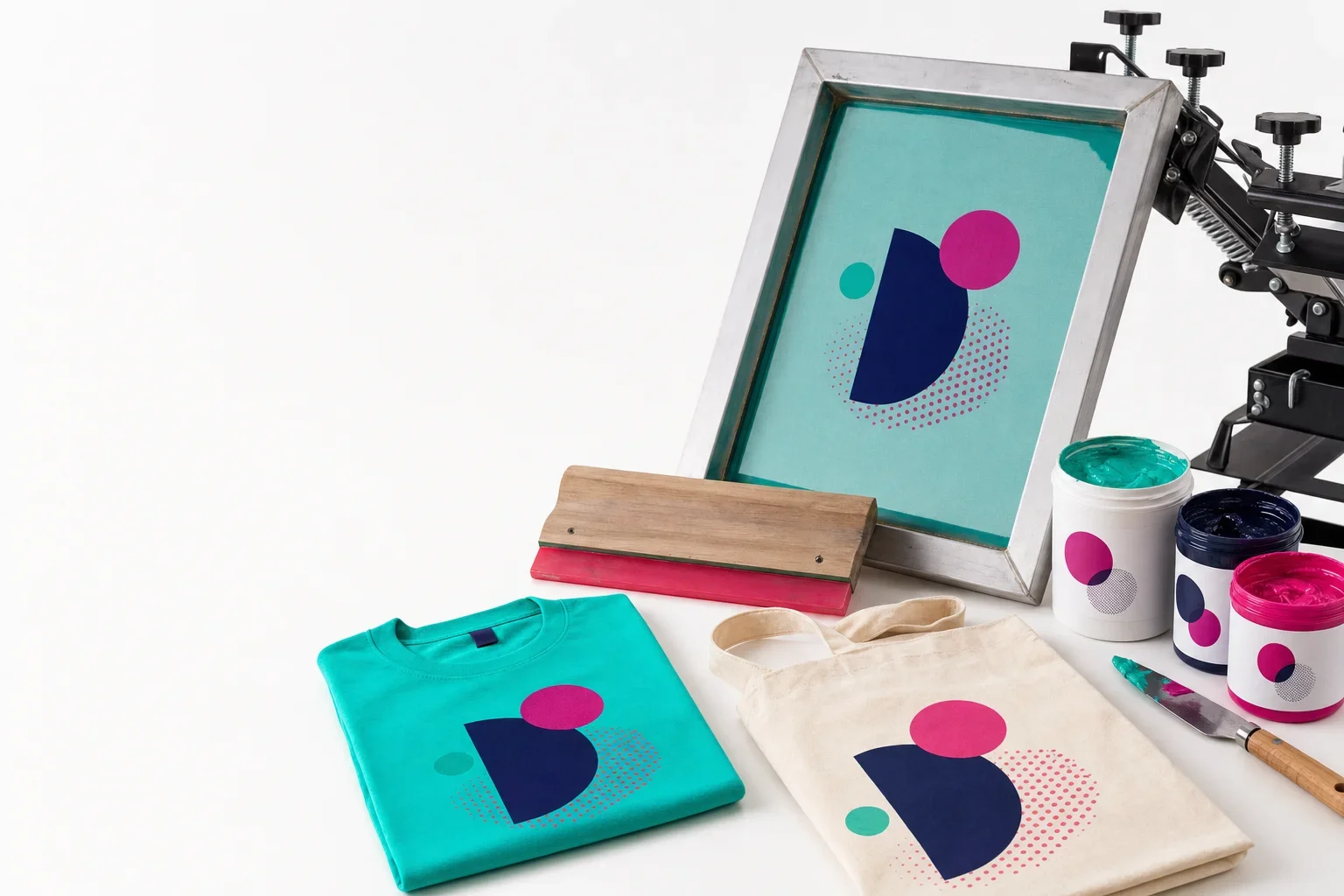
A screen in screen printing is a framed piece of mesh that has been prepared with a stencil of your artwork. Ink passes through the open areas of the screen and onto the product. The blocked areas keep ink from printing. In most screen printing jobs, each imprint color needs its own screen, which is why multi-color designs require more setup, more alignment, and more production time.
When customers hear “screen charge” or “setup fee,” it can sound like an extra fee added to the order for no obvious reason. But in screen printing, the screen is a real production tool that has to be prepared before ink ever touches the product.
A screen is not a computer screen. It is a physical frame stretched with mesh. That mesh is coated, exposed, washed out, dried, set up on the press, aligned, used for printing, cleaned, and eventually reclaimed so the frame can be used again.
That process takes time, equipment, materials, and skill. This guide explains what a screen is, how it is made, why each print color can require its own screen, and why setup fees are a real part of screen printing.
You do not need to understand screens before ordering
Purple Pie Promos reviews your artwork, product, imprint area, and decoration options before production. If screen printing is the right method, we help make sure the artwork is set up properly. If your logo has too many colors, gradients, tiny details, or another issue that makes screen printing less ideal, we can help guide you toward a better decoration method.
What Is a Screen?
A screen is a frame with tightly stretched mesh. In screen printing, that mesh becomes a stencil for your design.
The screen is coated with a light-sensitive emulsion. The artwork is then used to create open and blocked areas in the mesh. When ink is pushed across the screen with a squeegee, the ink passes through the open areas and lands on the product below.
In simple terms, the screen tells the ink where to go and where not to go.
What a Screen Does
A screen works like a stencil for one part of the printed design.
How Screens Were Traditionally Made
The traditional screen-making process has several steps. First, the artwork is separated by color. Then a film positive is created for each color. The screen is coated with emulsion, dried, exposed to light with the artwork film, and washed out so the printable areas open in the mesh.
That prepared screen is then dried again and brought to the press for setup and printing.
This old-school process is still important to understand because it explains why screen printing has real setup work. A screen does not appear out of thin air. It has to be prepared for that specific artwork and print color.
Traditional Screen Preparation
The classic process involves artwork, coating, exposure, washout, and setup.
How Screens Can Be Made Today
Modern screen printing shops may still use film positives, but many also use newer equipment that can create screens more efficiently.
Some systems use computer-to-screen or direct-to-screen technology, which images the artwork directly onto the coated screen from a digital file. Other shops may use automated coating, exposure, drying, reclaiming, or screen handling equipment to make the process more consistent and efficient.
Even with newer machines, there is still real production work involved. The screen still has to be coated, imaged or exposed, washed out, dried, inspected, registered on press, used, cleaned, and eventually reclaimed.
Helpful way to think about it
Modern equipment can make screen preparation faster and more consistent, but it does not eliminate setup. A physical screen still has to be prepared for the artwork before printing begins.

Why Each Color May Need Its Own Screen
In many screen printing jobs, each ink color needs its own screen. If your design is one color, it may need one screen. If your design has three solid colors, it may need three screens.
This is because each screen controls one part of the artwork. One screen prints the teal area. Another screen prints the navy area. Another screen prints the pink area. Each layer has to line up with the others so the final design looks correct.
This is one of the biggest reasons multi-color screen printing costs more than one-color screen printing.
One Color vs Multiple Colors
More print colors usually mean more screens, more setup, and more alignment.
One-Color Print
- Usually one screen
- Simpler setup
- Less alignment work
- Often more budget-friendly
Multi-Color Print
- May require multiple screens
- More setup time
- Registration must be aligned
- More production complexity
For more detail, read our guide on why each print color costs more.
What Is Registration?
Registration is the process of aligning screens so each ink color prints in the correct place.
For a one-color logo, registration is usually simpler because there is only one screen to position. For a multi-color design, each screen has to line up with the others. If the screens are slightly off, the colors can look shifted, blurry, or misaligned.
Registration can take time, especially when the artwork has tight details, outlines, small gaps, or colors that need to meet precisely.
Why Screen Alignment Matters
Multi-color screen printing requires each color layer to land in the right place.

Why Screen Setup Fees Are Real
Screen setup fees are not just random add-ons. They help cover the real time, materials, equipment, and labor involved in preparing the screen and setting up the press.
Before printing begins, the artwork may need to be reviewed, separated, prepared, and output for screen production. The screen may need to be coated, dried, exposed or imaged, washed out, dried again, inspected, taped, set up on press, aligned, tested, adjusted, and cleaned after the job.
That work happens whether you are printing 24 shirts or 2,400 shirts. This is why setup fees can feel more noticeable on small orders, while larger orders spread that setup cost across more pieces.
What a Screen Setup Fee Helps Cover
Setup includes real production steps before and after printing.
Artwork Prep
Reviewing files, separating colors, and preparing the design for screen production.
Screen Coating
Applying emulsion to the mesh and letting the coated screen dry properly.
Exposure or Imaging
Creating the stencil using film exposure or modern direct-to-screen equipment.
Washout and Drying
Opening the printable areas of the screen and drying it before use.
Press Setup
Mounting the screen, aligning the print, testing, and making adjustments.
Cleanup and Reclaiming
Cleaning ink, removing stencil material, and preparing frames for future use.
Cleaning and Reusing Screens
Screen printing frames are often reused, but they have to be cleaned and reclaimed before they can be used for another job.
After printing, ink has to be removed from the screen. The stencil or emulsion may need to be stripped out. The mesh may be cleaned, degreased, dried, and prepared for another coating.
This process is sometimes called reclaiming the screen. It allows the frame and mesh to be used again, but it still takes time, chemicals, equipment, and careful handling.
In some cases, damaged mesh may need to be replaced or a frame may need to be re-screened. Screens are production tools, and like any tool, they require maintenance.
What Happens After Printing?
The screen often has to be cleaned and reclaimed before it can be used again.
Why Screens Are Coated
Screens are coated with emulsion because the emulsion creates the stencil. Without the stencil, ink would pass through too much of the mesh and the design would not print correctly.
The coated screen is exposed to light with the artwork. The exposed and unexposed areas behave differently, allowing the printer to wash out the parts where ink should pass through.
This is why coating, drying, exposure, and washout are part of the setup process. They are what turn a blank mesh frame into a screen that can print your logo.
Helpful way to think about it
A blank screen is just mesh. A coated and exposed screen becomes a stencil for your artwork.
Why Setup Costs Matter More on Smaller Orders
Setup work happens before the order is printed, no matter how many pieces are in the order.
If a screen takes time to prepare for a 24-piece order, that setup cost is spread across only 24 products. If the same screen is used for a 500-piece order, the setup cost is spread across many more products.
This is one reason screen printing often becomes more cost-effective at higher quantities, especially for simple artwork.
Why Quantity Affects Value
The same setup work is spread across more or fewer pieces.
Small Order
- Setup spread across fewer pieces
- Per-piece impact feels higher
- Multi-color setup can feel expensive
- May benefit from another method
Larger Order
- Setup spread across more pieces
- Per-piece impact is lower
- Screen printing can become efficient
- Good fit for simple repeated designs
Why Multi-Color Printing Takes More Time
Multi-color screen printing is more involved because each color may require its own screen, ink, setup, and alignment.
The screens must be registered so every color lands in the correct place. If the design has tight outlines, small details, or colors that need to touch perfectly, alignment becomes more important and more time-consuming.
During production, printers may also need to test prints, adjust placement, check ink coverage, flash or cure layers, and make sure the final design stays consistent across the order.
This is why each print color can affect cost and production time. It is not only more ink. It is more preparation, more alignment, and more quality control.
Why More Colors Add Complexity
Each color can add setup, alignment, and production steps.
More Screens
Each color may require a separate screen and stencil.
More Ink Setup
Each color needs the right ink, placement, and production handling.
More Alignment
Screens must be registered so the colors line up correctly.
More Testing
Test prints and adjustments help make the final print look clean.
What If My Logo Has Many Colors?
If your logo has many colors, screen printing may still be possible in some cases, but it may not always be the best method.
Many promotional products only allow a 1-color screen print. Others may support multiple screen print colors, but each color may add setup and alignment. If your logo includes gradients, shadows, photographs, or detailed color transitions, a transfer, full color digital print, decal, sublimation, DTF, or DTG may make more sense.
The best method depends on the product, artwork, quantity, and desired finished look.
For more detail, read our guides on screen printing vs transfers, full color digital vs full color transfer, and why not every logo can be screen printed.
Common Misunderstandings About Screens
Screen printing is easy to underestimate because the final product can look simple. A one-color logo on a shirt or tote may look effortless, but there is a lot happening behind the scenes.
- A screen is a physical stencil, not a digital setting
- Each print color may require its own screen
- Screens have to be coated, exposed or imaged, washed out, and dried
- Multi-color designs require alignment, also called registration
- Setup fees reflect real production time, materials, equipment, and labor
- Screens must be cleaned and reclaimed after printing
- Small orders can make setup fees feel more noticeable
- Not every logo or product is a good fit for screen printing
Screen Printing Setup Checklist
Before choosing screen printing, use this checklist to understand what affects setup and production.
Screen Printing Setup Checklist
Screen printing setup depends on artwork, color count, product, and quantity.
Artwork
Is the logo clean, simple, and suitable for screen printing?
Color Count
How many ink colors are needed, and does the product support them?
Screens
Will the job require one screen or multiple screens?
Registration
Do multiple colors need to line up precisely?
Product
Does the material and imprint area work well for screen printing?
Quantity
Is the order size large enough for screen printing to make sense?
The Bottom Line
A screen in screen printing is a real physical production tool. It is a framed mesh stencil that must be prepared for your artwork before printing begins.
Screens require artwork preparation, coating, exposure or imaging, washout, drying, press setup, registration, printing, cleanup, and reclaiming. Multi-color designs can require multiple screens, and each screen must be aligned so the final print looks correct.
That is why setup fees are a real part of screen printing. They cover actual work, materials, equipment, and time.
A screen is not just a fee. It is the tool that makes the print possible.
Screen printing setup includes preparing the stencil, aligning the screen, testing the print, and cleaning everything afterward.
When each color needs its own screen, the setup is real production work, not a random charge.
Need help understanding screen printing costs?
Purple Pie Promos can review your artwork, color count, product, imprint area, and decoration options to help determine whether screen printing is the right fit for your order.
Request Screen Printing Help